


A complete game room doesn’t have one fixed price: budgeting for a complete game room setup depends on the games you choose, the room’s layout, seating, delivery, and finishing touches. Start with the main activity, then account for the furniture and practical details that make the room comfortable and ready to play.
It’s easy to focus on the centerpiece and overlook how much the surrounding choices shape the total. A pool table, shuffleboard table, air hockey table, or combination of games each calls for a different plan. Seating, lighting, and available space also affect what fits.
This guide breaks down the essentials, explains what drives setup costs, and shows how delivery, guest comfort, and thoughtful shopping choices affect your budget. Use it to prioritize the pieces that matter most and plan a welcoming game room without losing sight of the overall spend.
Key Takeaways
- Set the budget around the games you’ll use most, then account for the room layout and finishing touches.
- Plan delivery and assembly alongside your equipment choice so the route into the room and final placement are part of the setup.
- Choose seating that supports relaxed play and gives guests a comfortable place to gather between turns.
- Save by prioritizing essential pieces first and using thoughtful shopping choices to build the room over time.
- Use lighting, sound control, and accessories to make the room feel finished without letting extras overshadow the main setup.
1. Budgeting and setup cost tiers
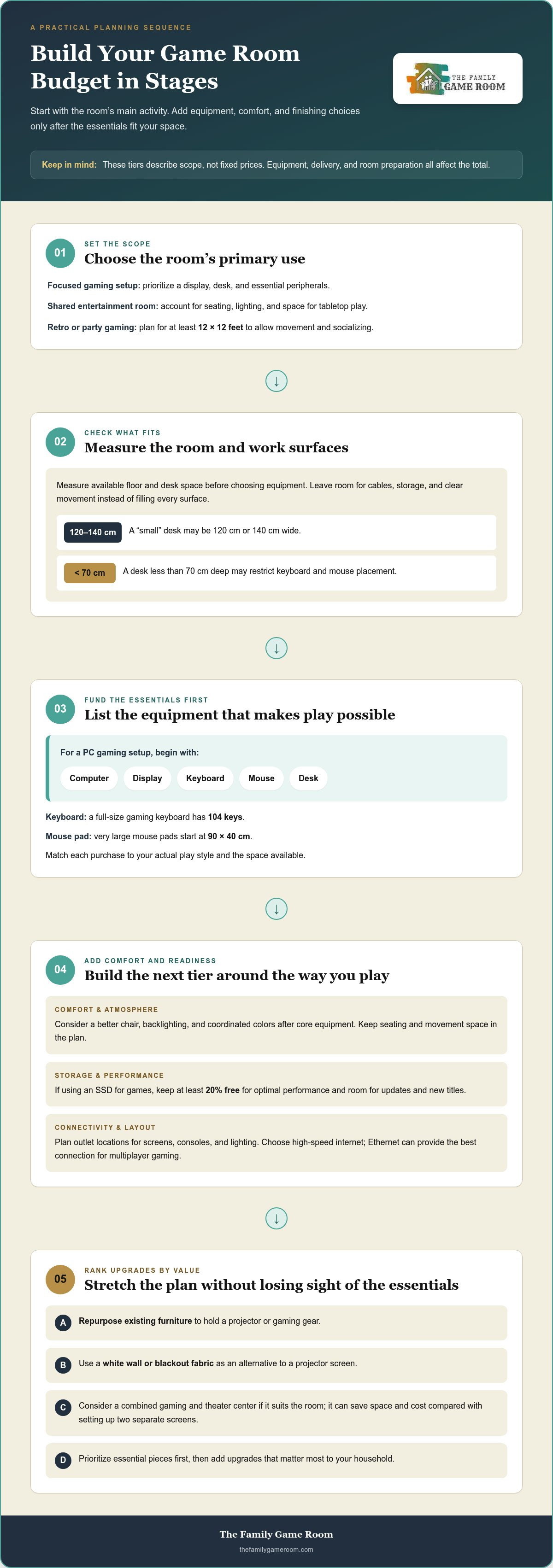
Build your budget around the room’s main activity, then add supporting equipment in stages. A focused gaming setup can prioritize a display, a desk, and essential peripherals. A shared entertainment room may also need seating, lighting, and space for tabletop play. These tiers describe scope, not fixed prices: equipment choices, delivery, and room preparation change the total.
Start with the essentials that make the room functional. For PC gaming, list the computer, display, keyboard, mouse, and desk before considering decorative upgrades. A full-size gaming keyboard has 104 keys, while very large mouse pads start at 90 by 40 cm. A desk described as small may be 120 cm or 140 cm wide; one less than 70 cm deep may restrict keyboard and mouse placement. Match each purchase to your actual play style and available room.
Next, add comfort and atmosphere as a separate tier. Backlighting, coordinated colors, and a better chair can make the space feel deliberate, but they should follow the core equipment. Set aside room for cables, storage, and clear movement rather than filling every surface. If you use an SSD for games, keep at least 20% free for optimal performance. That leaves room for updates and new titles without treating storage as an afterthought.
For a retro or party gaming room, plan for at least 12x12 feet to allow movement and socializing. Place outlets where screens, consoles, and lighting will sit, and account for the number and location of devices before arranging furniture. Choose high-speed internet; Ethernet can provide the best connection for multiplayer gaming. These requirements affect layout and readiness, even when they aren’t equipment line items.
Use a simple sequence to control spending: choose the room’s primary use, measure the available floor and desk space, list essential equipment, then rank upgrades by value to your household. Repurposing existing furniture can hold a projector or gaming gear, while a white wall or blackout fabric can serve as an alternative to a projector screen. If a combined gaming and theater center suits the room, it can save space and cost compared with setting up two separate screens. This practical approach keeps budgeting for a complete game room setup tied to real needs, not impulse extras.
2. Delivery and assembly services
Delivery planning starts with the room’s entrance, not its final layout. Measure the doorway, hallway turns, stairwells, and path to the intended position. A large game table may fit the room but prove difficult to move through a narrow passage. Clear furniture, rugs, and stored items from the route before delivery day. This preparation helps protect both the equipment and the home.
Separate the delivery route into three stages: arrival, movement indoors, and placement. Identify where the truck can stop, which entrance offers the clearest path, and where the equipment will go. Leave room to unpack components without blocking access. If you’re ordering multiple game tables or furnishings, decide where each item belongs before delivery.
Assembly affects when a room becomes ready to use. Pool tables and other game furniture may require professional installation, while accessories such as cue racks and lights need their own placement. Decide in advance who will handle assembly, installation, and leveling, and place equipment near its intended location. This avoids moving a heavy table or finished furniture through a tight doorway.
Before purchase, map the delivery and assembly details into your project plan. Record the item, destination, access route, assembly needs, and packaging disposal plan. This makes the logistical work visible alongside equipment and furniture decisions.
- Measure entrances and turns along the route to the room.
- Clear a staging area for boxes, tools, and assembly.
- Keep small hardware with its matching furniture or accessory.
- Plan where packaging will go after each item is unpacked.
Sequence the room around its largest or most complex pieces. Place a substantial gaming table before arranging smaller furniture, so it won’t need to be shifted around accessories later. Then position desks, seating, and storage to preserve clear walkways. If multiple deliveries arrive separately, keep the floor plan handy and mark each item’s location. A simple sketch can prevent boxes from occupying the space needed for assembly.
Invest time in preparation where it reduces avoidable lifting and rearranging. Keep pets and household traffic away from the working area, and protect nearby flooring during unpacking. After assembly, check that doors, drawers, and seating can move freely. Then organize cables and accessories around the final furniture layout, rather than building the setup twice.
For inspiration while planning the room’s equipment mix, browse game room options and note which pieces suit your floor plan.
3. Seating and guest comfort
Choose seating around the games guests will actually play. Bar stools suit a game table or bar-height surface, while comfortable chairs can make a viewing area more inviting. For a mixed-use room, combine dedicated seats with movable options. This gives guests somewhere to relax without crowding the playing area or blocking access to equipment.
Match each seat to its location. Place a supportive chair at a computer station, then arrange a sofa or lounge chair where people can watch a tournament. Keep seats clear of doorways and walking paths. If guests need to move between a screen and a tabletop game, leave an open route instead of filling the center with furniture.
Consider comfort beyond the chair itself. A nearby surface gives players a place for drinks, controllers, or cards, while a blanket offers a cozy option between rounds. A storage ottoman can hold smaller game pieces and provide extra seating when guests gather. Choose storage that opens easily and doesn’t block access to the games.
Lighting also shapes how inviting the room feels. Use task lighting where players read cards or handle small game pieces, and softer lighting near lounge seating. Avoid placing bright lights directly behind a screen, where reflections can distract gamers. A dimmable lamp near the sofa, for example, can support conversation without overpowering the display.
Plan for wireless devices and charging before placing seats. Keep a charging spot close to the lounge area, and organize controllers or headsets in a nearby basket. This prevents accessories from collecting on the floor or taking over the table. For a wireless gaming setup, place the charging station where guests can reach it without crossing active play areas.
Use a simple comfort check before buying more furniture. Sit in each planned spot, test the view of the games, and confirm that guests can reach tables and storage. A seat may look elegant but feel awkward if it faces away from the action. Adjust the layout first, then decide whether another chair or footrest would improve the room.
Keep the budget focused on pieces that serve more than one purpose. A dining top can turn a pool table into a surface for meals between games, while a storage bench can keep accessories organized and provide extra seating. Choose durable, easy-to-clean surfaces for frequently used areas, and save decorative upgrades for after the main layout works. That balance makes the room comfortable for players and spectators alike.
4. Shopping timing and saving strategies
Buy in stages, starting with items that determine the room’s layout. Measure the gaming desk area and choose the screen before adding accessories. This order reduces the chance of buying furniture that blocks a doorway or leaves too little workspace. Keep a written list of essentials, useful upgrades, and decorative extras, then purchase from the top down.
Timing works best when it follows a clear decision, not an impulse. Before buying, compare the exact features you need across several options. For a display, consider its intended use, available space, and connection needs. For a gaming desk, prioritize a surface that fits your equipment. A lower price doesn’t help if the item forces a second purchase or disrupts the room’s layout.
Second-hand shopping can stretch a budget for selected items. Look among peers, online resale websites, and garage sales for gaming peripherals or wireless chargers. Compare the item’s condition, included parts, and usefulness against your list. A pre-owned accessory can be a sensible buy if it serves the planned setup. Skip items that need missing components or don’t fit your equipment.
- Search second-hand listings for peripherals and wireless chargers.
- Compare condition and included components before choosing.
- Print board game designs instead of purchasing physical games.
- Consider smaller board games when portability and space matter.
For shared entertainment, choose purchases that serve more than one activity. A larger screen may suit both gaming and movie nights, while a compact game can travel between rooms. Printed board game designs can also avoid buying a physical copy. Decide how each item will be used before spending, and give priority to pieces that support regular play.
Keep a simple shopping record with each item, its purpose, and its place in the room. Note when one purchase depends on another, such as a dining top that must fit the selected pool table. Review the list before checkout. This catches duplicate accessories and helps separate must-haves from decor that can wait.
Finally, use the room before expanding it. After the main setup is in place, note what interrupts the gaming experience: a missing charging spot, awkward screen angle, or lack of storage for game pieces. Buy to solve those specific problems. This measured approach helps make each purchase useful, while leaving room to refine the space as your play habits become clear.
5. What do gaming room lighting, audio, and accessories cost?
Lighting, audio, and accessories don’t have one fixed cost. Their share of the budget depends on room size, existing equipment, sound goals, and finish level. A functional setup may use a task light and basic speakers already on hand. A more immersive room could add layered lighting, surround sound, and acoustic treatments. Plan these as separate choices, rather than treating “extras” as one package.
Begin with the room’s lighting needs. A desk lamp can illuminate a keyboard, while softer lamps can brighten seating without competing with a screen. Backlighting adds visual atmosphere, but it isn’t essential for comfortable play. For a table-based game area, a billiard light fixture can focus illumination over the playing surface. The right choice depends on where people play, read, or gather.
Audio choices depend on how the room is used. Headphones suit solo gaming and help keep sound contained. Speakers work better when guests share a game or watch a screen together. A combined gaming and entertainment center can use a surround sound system. Consider speaker placement, nearby seating, and the room’s surfaces before investing in more equipment.
Hard surfaces can create echoes during gameplay or movie nights. Rugs, acoustic panels, and soundproofing foam can absorb sound and reduce echoes. Start by noticing where voices or game audio sound harsh, then treat those areas selectively. For example, a rug can soften sound beneath a seating area, while panels can address reflections on nearby walls. The amount of treatment depends on the room and desired sound.
Accessories are easier to budget for when grouped by purpose. Keep charging gear near controllers, use cable sleeves or adhesive clips to tidy wires, and place storage where small items are used. These practical additions can improve day-to-day use without requiring a full redesign. Decorative lighting, matching accents, and extra audio equipment can wait until the essentials work well.
- Essential: task lighting for play surfaces and existing audio equipment.
- Comfort: a rug or targeted acoustic treatment where sound echoes.
- Immersion: backlighting or surround sound for a shared entertainment space.
- Finishing touches: cable management, charging accessories, and coordinated lighting.
Choose each upgrade based on a specific need, such as poor visibility, tangled cables, or echo. To plan lighting around tabletop play, explore billiard lighting options as part of your room design. Add audio and accessories in stages, so every purchase has a clear purpose.
A simple color theme can be created with color and lighting upgrades, matching throw pillows, paint upgrades, and curtains. Second-hand gaming room items can include wireless chargers and gaming peripherals.
The Family Game Room: Pool Table Dining Tops
The Family Game Room is a natural next step if you’re choosing a centerpiece or making one room serve more than one purpose. A Pool Table Dining Top adds a dining surface to a pool table, helping the room transition from play to shared meals. For a different group activity, explore indoor shuffleboard, air hockey, and foosball tables.
Use your floor plan and priorities to narrow the choice. A dining top suits a room that needs both game time and everyday function, while a shuffleboard, air hockey, or foosball table brings a distinct activity to the space. Compare how each option fits your layout, how guests gather, and the role you want the room to play.
Contact The Family Game Room to explore options for your game room.
Make the Room Yours
The best game room is one that fits the way your household wants to spend time together. Before your next choice, picture an ordinary evening in the space: what will people play, where will they gather, and how should the room work when the game is over? Those answers can turn budgeting for a complete game room setup into a plan grounded in daily use, rather than a list of purchases.
If a pool table is central to your vision, The Family Game Room offers American Heritage Billiards and Nixon Billiards pool tables, along with pool table dining tops. A dining top lets the room serve another purpose between matches. Choose the option that suits your home and the way you want to host.
Contact The Family Game Room to explore options for your space. A welcoming game night begins with a room that feels unmistakably yours.
Frequently Asked Questions
What is needed in a gaming room?
A gaming room needs a main activity, equipment that supports it, and enough room to use everything comfortably. For a console setup, that might mean a screen, console, controllers, and a place to sit. For tabletop play, prioritize the game surface and clear access around it. Add power access, internet for online gaming, and storage for items that would otherwise clutter the play area.
What does a complete game room setup include?
A complete setup includes the games and supporting pieces that make them usable. That might mean a pool or poker table, seating for players, lighting suited to play, and storage for accessories. A family room could combine a main game with flexible seating and a dining surface. Choose pieces based on who will use the room and whether it also serves everyday household needs.
How much does a complete game room setup cost in the U.S.?
There isn’t one useful total for every U.S. game room because the equipment and room plans differ. Build an estimate by adding the chosen game equipment, delivery and assembly needs, furniture, and any electrical or room preparation. A single activity with existing furnishings has different cost drivers from a room with several dedicated games. Keep product costs separate from setup and finishing expenses.
How much does it cost to set up a game room for multiple players?
The total depends on whether guests share equipment or need separate activities. A pool table may anchor the room around one playing surface, while adding shuffleboard or air hockey creates more ways to play. Seating and storage needs also vary with the group’s habits. First decide which activities matter most, then estimate the equipment needed for that plan.
What is the difference between a budget and premium game room setup?
A budget setup focuses on essential equipment and practical use, often relying on furnishings already in the home. A premium setup may include coordinated furniture, a more refined finish, dedicated lighting, and equipment selected for a consistent look. The distinction is less about a fixed checklist than about materials, presentation, and how many activities the room supports. Decide which upgrades improve your experience before choosing them.
How can I plan a game room budget and prioritize purchases?
Start by writing down the room’s primary use and the people who will use it. Sort planned purchases into essentials, useful improvements, and optional decor. Price each item separately, including delivery or installation where relevant, and note any purchase that depends on another piece. Buy in that order, then reassess the room after using it before adding extras.
How can I save money on game room equipment without sacrificing quality?
Save by matching equipment to actual play habits instead of paying for features the household won’t use. Check that accessories work with the equipment you already own, and avoid buying duplicate items for the same purpose. Reuse suitable furnishings, then direct spending toward the game pieces used most often. Add decorative upgrades later, once the room’s daily needs are clear.