


What if the easiest way to get everyone off their devices wasn’t a stricter screen rule, but a more inviting place to spend time together? Creating a tech-free family zone can make shared moments feel appealing rather than enforced, and it doesn’t require a spare room. A corner of the living room or a spot at the dining table can become a natural gathering place.
If screen limits have sparked arguments, or family time often means everyone scrolling separately, a welcoming alternative can help. The goal isn’t to ban technology from family life. It’s to agree on realistic boundaries together and make enjoyable activities easy to start. This guide will help you choose a practical spot, set device expectations everyone can support, and keep screen-free activities close at hand. From books and puzzles to a shared game, small, repeatable choices can make connection part of your routine.
Key Takeaways
- Creating a tech-free family zone can start with a shared corner or routine, not a dedicated room.
- Compare a dedicated space, a shared-room setup, and device-free family time to find what fits your home.
- Set boundaries together so expectations feel practical for everyone, not like a punishment.
- Use a simple five-step approach to shape your space and make adjustments as your family’s needs change.
- Explore screen-free options that suit your family, from conversation and creative projects to shared games.
Why creating a tech-free family zone can make shared time easier
Wanting fewer screen distractions doesn’t mean you want every device to become a family argument. Phones, tablets, and other screens have practical uses, so an all-or-nothing rule can be difficult to maintain. Creating a tech-free family zone offers a more focused alternative: agree on a particular place or time when devices are set aside so family members can give one another their attention.
A tech-free family zone is a welcoming shared place or gathering time with device boundaries the family agrees on, not a punishment for using screens. The aim is connection and intentional use, not shame or perfect compliance. For general background on how screen use is defined and discussed, see this overview of research on screen time.
What counts as a tech-free family zone?
It could be a whole room, a corner with comfortable seating, or a regular family gathering such as dinner or game night. The boundary applies to that chosen place or time, not automatically to every room in the home. That distinction keeps the idea manageable and lets family members use devices elsewhere as needed.
Agree on exceptions, too. Someone may rely on a device for accessibility, health, work, or an urgent practical need. Discussing those situations in advance makes the boundary more inclusive and avoids treating every screen use as a rule-breaking moment.
Why make the change as a family?
Shared expectations make it clearer when devices are put away and what everyone can expect during that time. Instead of one person repeatedly reminding others, the family can settle on a simple routine, such as putting phones aside during a meal or keeping them out of a shared activity. The right boundary is one your household can explain and maintain.
Include adults in the agreement. If parents ask children to put devices away while continuing to check their own notifications, the expectation may feel one-sided. Modeling the same habit shows that the zone is for everyone, not a rule aimed only at younger family members.
Choose a purpose that feels worthwhile to your household. You might want more relaxed conversation, a chance to play, or a calmer way to unwind together. Keep the focus on what the family gets to do, rather than what everyone has to give up. A welcoming routine is easier to return to than a screen ban built around blame.
Choose a place and set screen boundaries your family can maintain
The best spot is often one your family already uses. A comfortable living-room corner, dining area, or another shared space can work as well as a dedicated room. As you choose, consider whether everyone can gather easily and whether the space feels pleasant enough to return to. Comfortable seating, useful lighting, a place to set things down, and manageable noise can all make shared time more inviting.
A workable family boundary is specific, shared, and flexible when needed. Decide together where it applies, which devices are included, and when the expectation starts and ends. For example, your household might agree to put phones away during a shared activity, while leaving other device use outside that time unchanged. Clear limits prevent guesswork without turning the boundary into a rule for the entire home.
Find the right spot without adding a room
Choose a place that fits your routines, not an idealized layout. If family members naturally gather around the dining table, start there. If evenings tend to happen in the living room, a corner with enough seating may be a better fit. Consider storage for devices and activity supplies, too, so the area stays ready without a major rearrangement.
Keep the first setup simple. Try the location during a regular family gathering, then notice what gets in the way. Is the seating uncomfortable, the lighting poor, or the space too tight for everyone? Adjust the location or arrangement after trying the routine. Creating a tech-free family zone can be an experiment, not a permanent renovation.
Agree on device rules together
Invite each family member to suggest a time or place where fewer screens would feel welcome. Then turn broad ideas into clear actions. “Be present” can mean different things to different people; “put phones in the agreed storage spot during our shared activity” is easier to understand and follow.
Talk through necessary exceptions before the first device-free gathering. A family member may need a device for accessibility, health, work, or an urgent message. Agree on how those needs fit the boundary and how someone can step away when needed. That conversation helps the routine feel fair rather than enforced by surprise.
Keep the space suited to your household’s interests. If a shared game table fits your available room and routines, you can explore game-room options as one possible addition. It’s only one route; the best setup is the one your family can comfortably use.
Compare tech-free zone setups to fit your home and family
There’s no single layout every household needs. A dedicated room can make sense if you already have suitable space, but a welcoming corner or a regular device-free gathering can work just as well. Compare the options by the effort they ask of your household, not by how impressive the finished setup looks.
An effective tech-free zone is defined by shared use, not room size. The goal is a setting your family can return to comfortably, with expectations that feel clear rather than punitive.
| Setup | Space required | Setup effort | Flexibility | May suit |
|---|---|---|---|---|
| Dedicated room | A separate room | Higher if the room needs furnishing or organizing | Moderate | Households that already have a suitable room and want a consistent gathering place |
| Shared-room corner | A small area in an existing room | Low to moderate | Moderate | Families who want a recognizable gathering point without dedicating a whole room |
| Device-free family time | No permanent space | Low | High | Households with limited space or schedules that make a recurring time easier than a fixed location |
Match the setup to household needs
Think about how family members will use the space or routine. Younger children may enjoy activities that need room to spread out, while older family members may prefer conversation or a shared game. Consider mobility and access, too: everyone should be able to reach the gathering place and take part comfortably. Choose activities your household already likes before planning around a new setup.
Schedules matter as much as floor plans. A shared corner can be ready whenever family members have time, while a recurring device-free period offers a clear start and finish for households with busy or changing routines. The boundary can flex for practical needs, such as accessibility or an urgent message, without dropping the shared expectation altogether.
Start with the simplest option you can maintain. If a regular device-free gathering works, there’s no need to create a permanent zone. If family members naturally gravitate to one spot, make that area more comfortable and easy to use. Try the setup, notice what gets in the way, and adjust together. The right choice invites people in and fits real family life.
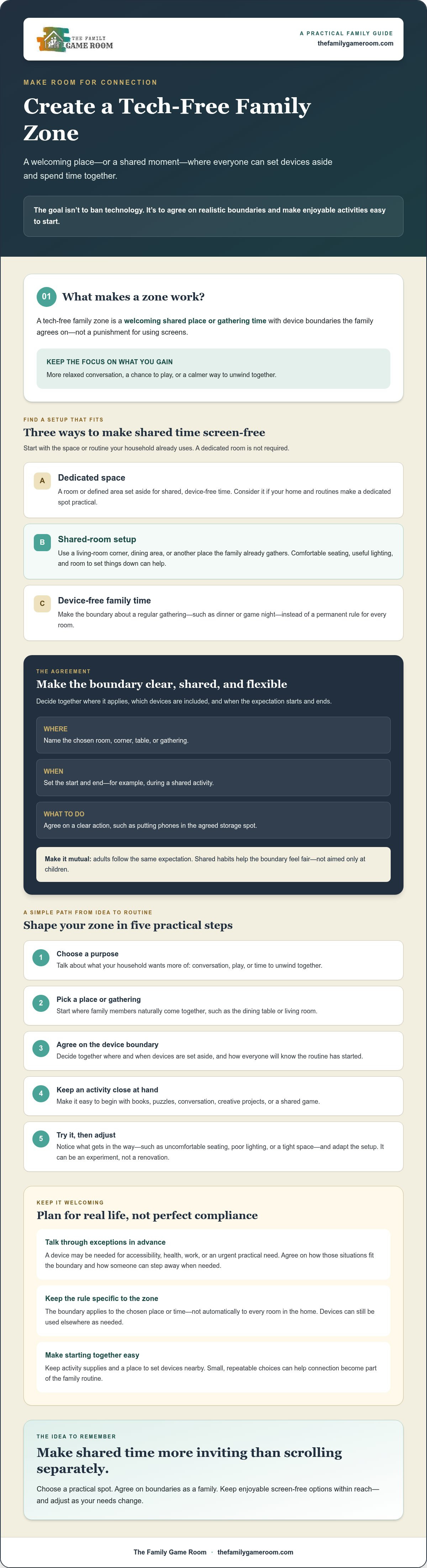
Create your tech-free family zone in five practical steps
Keep the setup light. You don’t need new furniture or equipment to begin, just a shared purpose, a clear agreement, and something enjoyable to do together. Creating a tech-free family zone can start with what’s already in your home.
1. Choose a purpose
Ask everyone what they’d like more of during shared time: conversation, play, creative projects, or a chance to relax without interruptions. Let each family member suggest an idea. A purpose the whole household recognizes gives the routine a positive focus, rather than making it feel like a list of things people aren’t allowed to do.
2. Select a spot
Choose an existing place that can comfortably accommodate the activity you have in mind. Clear a living-room corner, make room at the table, or use another familiar gathering spot. Check that everyone can access it and has somewhere comfortable to sit. Start with current seating and storage; rearranging what you have may be enough.
3. Agree on boundaries
Decide together when the boundary applies and what happens to devices during that time. For example, the family might put phones away during a chosen shared activity. Make the action easy to understand, then discuss exceptions such as accessibility needs or an urgent message before they arise. Adults should follow the same expectation.
4. Prepare activities
Make it simple to get started. Keep a few familiar options within reach, such as a deck of cards, a puzzle, books, drawing supplies, or a board game. Choose one first activity as a family, so nobody has to spend the gathering deciding what to do. The goal is an inviting setup, not a perfectly stocked room.
If your family enjoys table games and has the space for one, you can explore game tables for shared play. It’s an optional way to build around an activity your household already enjoys, not a requirement for device-free time.
5. Review and adjust
Try the routine for a manageable period that your family chooses, then check in together. Ask what felt fun, what felt awkward, and what made it difficult to take part. Treat the answers as useful feedback, not a scorecard. You might change the activity, move to a more comfortable spot, or clarify when the device boundary applies. Small adjustments help the routine fit real family life.
Keep family connection at the center of your tech-free zone
A screen-free space needs something welcoming to draw people in. That doesn’t mean planning elaborate entertainment or filling a room with equipment. Conversation over a snack, a board game, a shared creative project, or simply listening to music together can all give family members a reason to gather. The best activity is one your household actually enjoys.
Choose activities everyone can join
Offer a mix of quick options and longer activities. A short round of cards or a conversation prompt can suit a busy evening, while a puzzle, craft, or board game may work when there’s more time. Invite family members to take turns suggesting what to do. Sharing the choice helps keep one person from carrying the whole job of making family time fun.
Match activities to the people and space available. Air hockey or foosball can be options for shared play if your household enjoys them and has room. They aren’t essential, though. A simple game, drawing supplies, or a favorite topic to talk about can make the zone just as inviting. Rotate choices so different ages and interests have a chance to shape the gathering.
Make the habit welcoming and sustainable
Choose a rhythm that fits your real schedule, whether that’s a regular evening, a shared meal, or another time your household can make work. A predictable cue, such as putting devices aside before starting an activity, can help everyone know what to expect. Leave room for occasional changes; missing a planned gathering doesn’t mean the routine has failed.
Focus on participation and moments you enjoyed together, rather than counting perfect device-free days. If an activity falls flat, let the family pick another next time. The aim is a comfortable habit people want to return to, not a test of willpower. Creating a tech-free family zone is ultimately about making connection easier to choose.
You don’t need to buy anything to begin. Start with an activity and space you already have, then explore additional possibilities only if they suit your household. Explore game-room ideas for your home for inspiration on shared play and equipment that may fit your family’s interests and available space.
Make room for more meaningful family time
Creating a tech-free family zone doesn’t require a dedicated room or a perfect screen-free routine. Choose a space or gathering time that fits your household, agree on clear boundaries together, and keep an enjoyable activity close at hand. Start small, then adjust based on what feels comfortable and worthwhile for everyone.
The aim is connection, not strict device-free streaks. Conversation, creative projects, and games can all help make shared time feel inviting. No purchase is needed to begin, but if a game table could suit your family’s interests and available space, explore game-room ideas for your home. The Family Game Room is family-owned and operated, with a selection that includes pool, air hockey, foosball, poker, and shuffleboard tables.
Choose one simple activity and invite everyone to join. Small moments together can become a family routine worth returning to.
Frequently Asked Questions
What is a tech-free family zone?
A tech-free family zone is a shared space or recurring time when household members agree to set aside personal screens. It might be a living-room corner, the dinner table, or a family activity, rather than a rule for every room. The family chooses which devices are put away and agrees on reasonable exceptions. The aim is to make conversation and shared activities easier to choose, not to punish anyone for using technology.
How do I create a tech-free zone at home?
Start by agreeing on why you want one, then choose an existing shared spot or a regular device-free time. Decide together which devices are set aside and when the boundary applies. Put a few familiar activities within easy reach, such as books, cards, or art supplies. Try the routine, then ask what’s working and what isn’t. Creating a tech-free family zone can begin with a small, repeatable plan, not a major home makeover.
Can a tech-free family zone work in a small home?
Yes, a separate room isn’t necessary. A comfortable corner of the living room, a dining area, or a shared activity at a regular time can create a clear opportunity to connect. Use existing furniture and household supplies first. Focus on whether people can gather comfortably and understand the device boundary. If the space feels cramped or inconvenient, try a different spot or make the zone a recurring family time instead.
How do I get kids to follow tech-free family rules?
Involve children in choosing the space, activities, and boundaries so the agreement feels shared. Explain the purpose positively, such as making time to talk, play, or create together. Adults should model the same expectations where practical. Agree on exceptions in advance, including times a device is needed for an important reason. If the routine is difficult, discuss what’s getting in the way and adjust it together rather than using shame.
What activities can families do in a tech-free zone?
Families can talk, read, make art, work on a shared project, or play board and table games. Choose activities that suit your available space, everyone’s interests, and the time you have. A quick card game may fit a short gathering, while a puzzle or creative project can suit a longer one. You don’t need to buy equipment to begin. Invite each family member to suggest an activity and take turns choosing.
How can we maintain a tech-free family zone without arguments?
Make the agreement clear, involve everyone in setting it, and begin with a routine your household can manage. Explain exceptions before they come up, and have adults follow the same expectations where practical. Keep an enjoyable activity available so the zone offers something positive. If disagreements happen, ask what feels difficult and make adjustments together. An imperfect day isn’t a failure; it’s a chance to make the plan more workable.